스마트폰 또는 컴퓨터로 구글 시트와 구글 스크립트를 이용한 출석체크하는 걸 구현 해본다.
먼저 아래와 같이 구글 시트 샘플을 만든다.
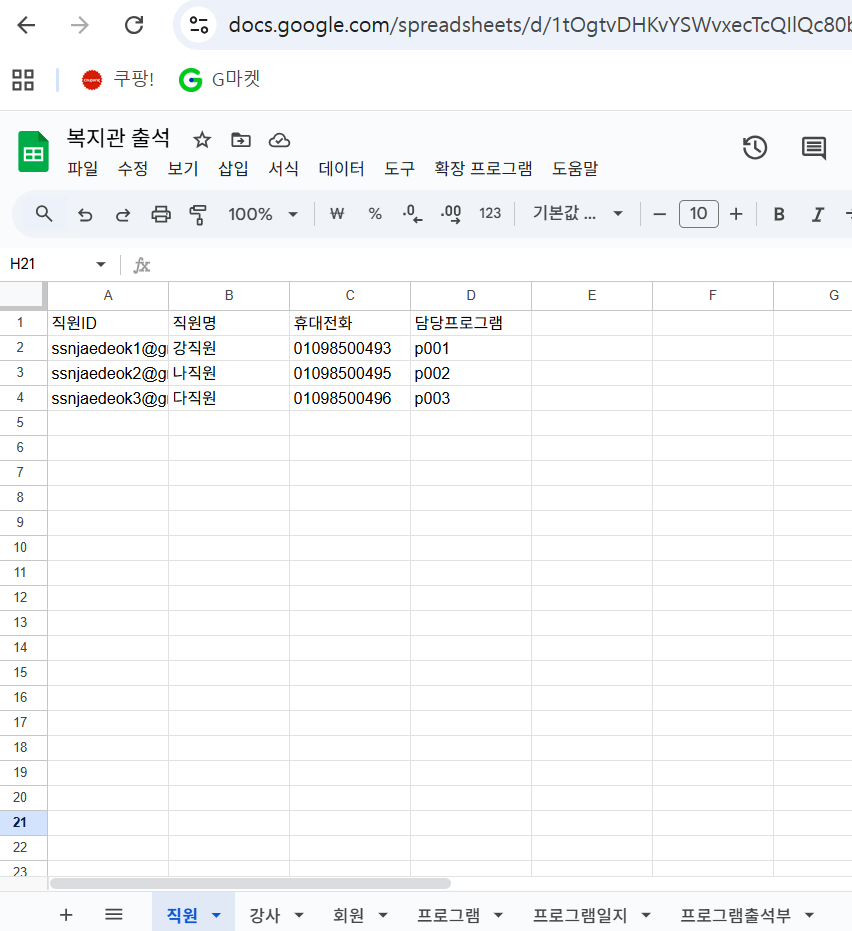
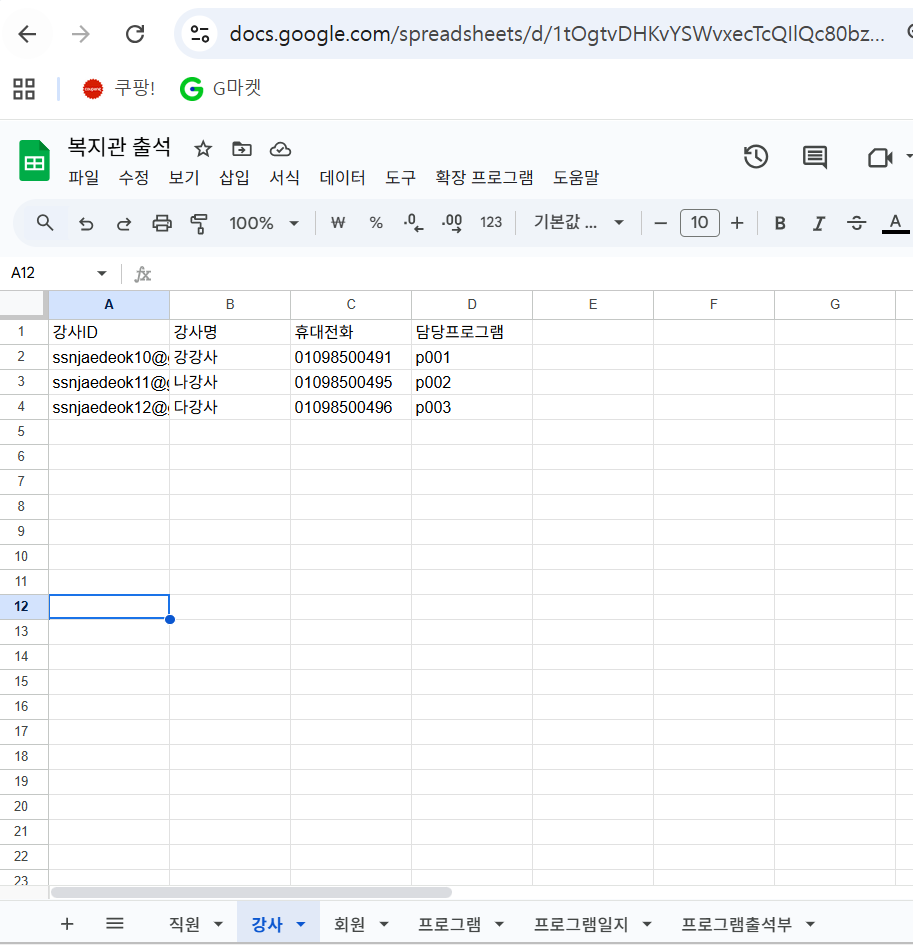

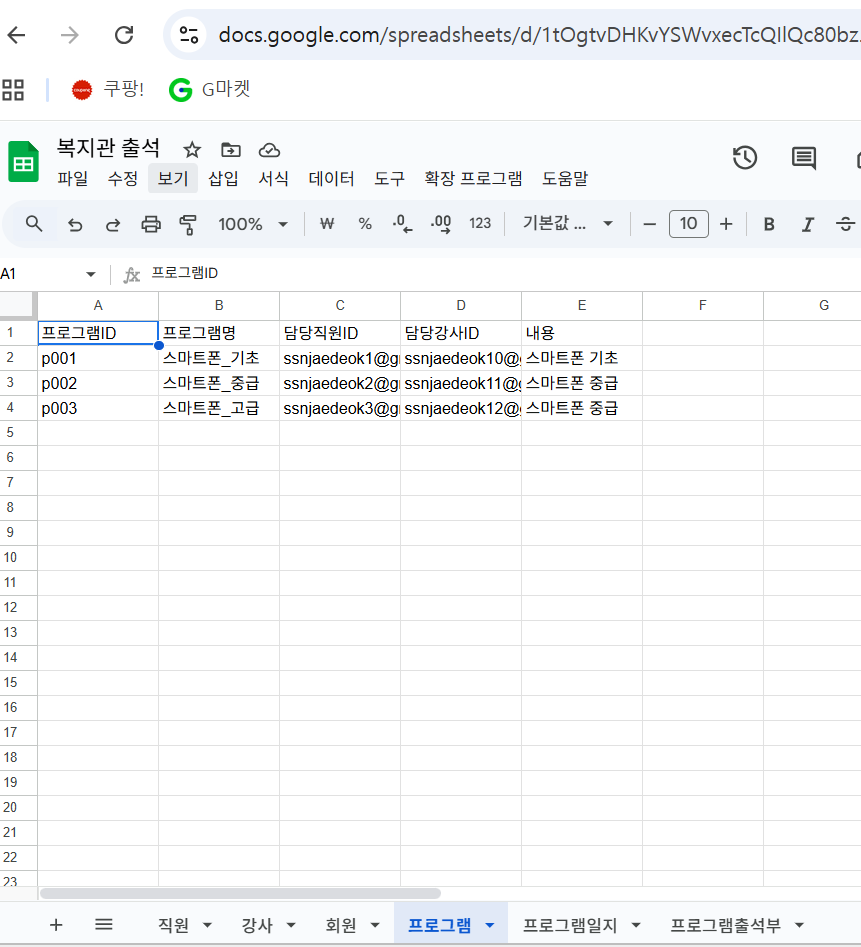
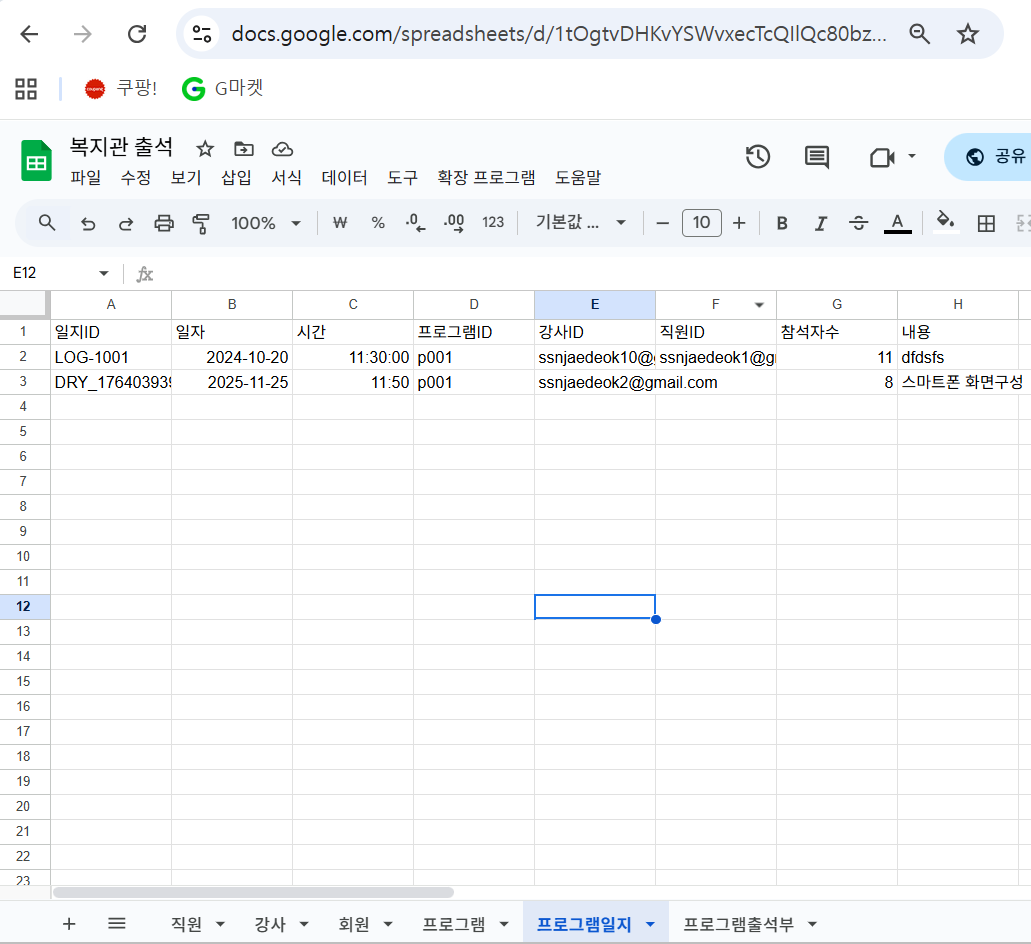
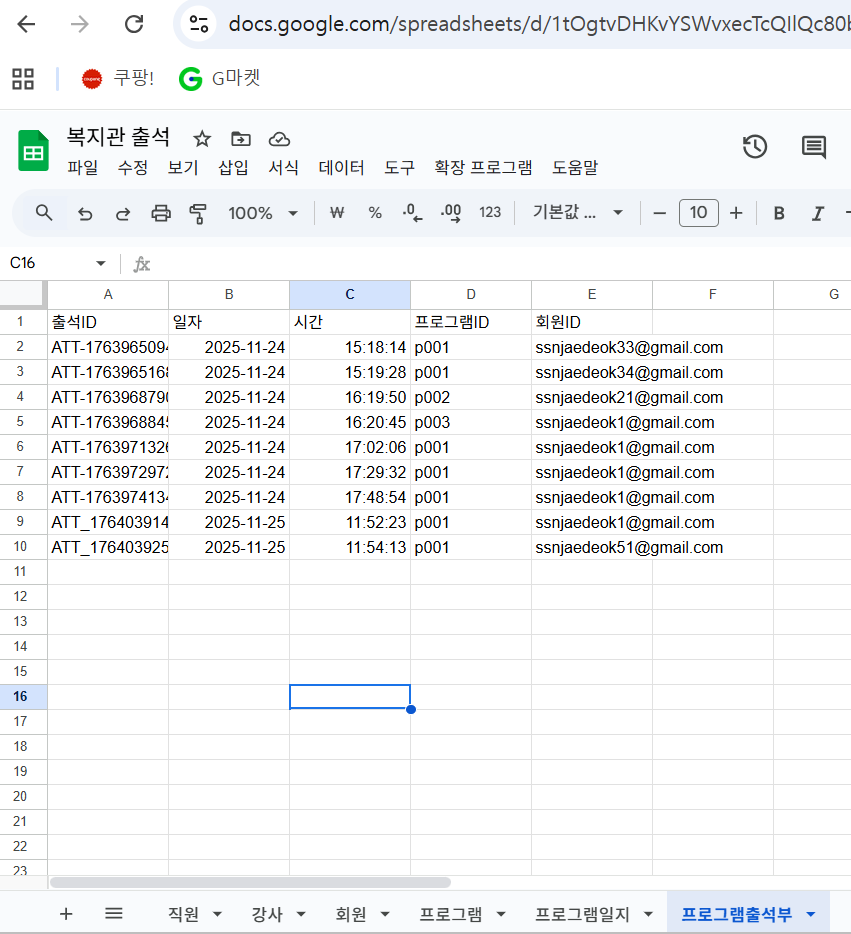
이제 확장프로그램 - Apps Script 를 클릭하여
Code.gs 에 아래 소스를 복사하여 넣는다.
/** ==== Code.gs ==== **/
const SPREADSHEET_ID = '구글시트 ID';
const SHEETS = {
  staff: '직원',
  instructor: '강사',
  program: '프로그램',
  diary: '프로그램일지',
  member: '회원',
  attendance: '프로그램출석부',
};

const DATE_TZ = 'Asia/Seoul';

/** ===== 유틸 ===== **/
function ss() { return SpreadsheetApp.openById(SPREADSHEET_ID); }

function getSheet(name) { return ss().getSheetByName(name); }

function readTable(name) {
  const sh = getSheet(name);
  const rng = sh.getDataRange();
  const values = rng.getValues();
  const headers = values.shift();
  return values.filter(r => r.some(v => v !== '' && v !== null)).map(row => {
    const obj = {};
    headers.forEach((h, i) => obj[h] = row[i]);
    return obj;
  });
}

function appendRow(name, obj) {
  const sh = getSheet(name);
  const headers = sh.getDataRange().getValues()[0];
  const row = headers.map(h => obj[h] ?? '');
  sh.appendRow(row);
}

function genId(prefix) {
  return `${prefix}_${new Date().getTime()}_${Math.floor(Math.random()*100000)}`;
}

function parseIdList(v) {
  if (!v) return [];
  return String(v).split(',').map(s => s.trim()).filter(Boolean);
}

/** ===== 권한/역할 판별 ===== **/
function getUserEmail() {
  // 배포 시 "조직 내 사용자" 혹은 "Google 계정 필요"로 설정해야 이메일을 얻을 수 있음
  const email = Session.getActiveUser().getEmail();
  return email || '';
}

function getRoleByEmail(email) {
  const staff = readTable(SHEETS.staff).find(r => String(r['직원ID']).toLowerCase() === email.toLowerCase());
  if (staff) return { role: '담당', record: staff };

  const instructor = readTable(SHEETS.instructor).find(r => String(r['강사ID']).toLowerCase() === email.toLowerCase());
  if (instructor) return { role: '강사', record: instructor };

  const member = readTable(SHEETS.member).find(r => String(r['회원ID']).toLowerCase() === email.toLowerCase());
  if (member) return { role: '회원', record: member };

  return { role: 'guest', record: null }; // 이메일 미등록
}

function getAccessibleProgramIds(roleInfo) {
  if (!roleInfo || !roleInfo.record) return [];
  const rec = roleInfo.record;
  const key = roleInfo.role === '회원' ? '접수프로그램' : '담당프로그램';
  return parseIdList(rec[key]);
}

/** ===== 웹앱 엔드포인트 ===== **/
function doGet(e) {
  const email = getUserEmail();
  const roleInfo = getRoleByEmail(email);
  const programs = readTable(SHEETS.program);
  const accessibleIds = getAccessibleProgramIds(roleInfo);

  const tmpl = HtmlService.createTemplateFromFile('index');
  tmpl.data = {
    email,
    role: roleInfo.role,
    programs: programs,
    accessibleIds: accessibleIds,
  };
  return tmpl.evaluate()
    .setTitle('복지관 프로그램 출석체크')
    .setXFrameOptionsMode(HtmlService.XFrameOptionsMode.ALLOWALL);
}

function doPost(e) {
  const email = getUserEmail();
  const roleInfo = getRoleByEmail(email);
  const payload = JSON.parse(e.postData.contents);

  if (payload.action === 'submitAttendance') {
    return handleSubmitAttendance(roleInfo, payload);
  }
  if (payload.action === 'listAttendance') {
    return handleListAttendance(roleInfo, payload);
  }
  if (payload.action === 'addDiary') {
    return handleAddDiary(roleInfo, payload);
  }
  return ContentService.createTextOutput(JSON.stringify({ ok: false, error: 'Unknown action' }))
    .setMimeType(ContentService.MimeType.JSON);
}

/** ===== 출석 등록 ===== **/
function handleSubmitAttendance(roleInfo, payload) {
  // 회원만 직접 출석 등록 허용 (직원/강사는 대리 입력도 가능 옵션)
  const programId = String(payload.programId || '');
  const name = String(payload.name || '').trim();
  const phone = String(payload.phone || '').trim();

  // 권한 체크: member는 자신의 접수 프로그램만, staff/instructor는 담당 프로그램만 허용
  const allowedIds = getAccessibleProgramIds(roleInfo);
  if (allowedIds.length && !allowedIds.includes(programId)) {
    return json({ ok: false, error: '권한이 없는 프로그램입니다.' });
  }

  // 회원ID 매칭: 이메일 우선, 없으면 이름+휴대전화로 탐색/생성
  const members = readTable(SHEETS.member);
  let member = members.find(m => String(m['이메일']).toLowerCase() === getUserEmail().toLowerCase());
  if (!member) {
    member = members.find(m =>
      String(m['회원명']).trim() === name &&
      String(m['휴대전화']).trim() === phone
    );
  }
  if (!member) {
    // 신규 회원 레코드 생성 (간편 등록)
    member = {
      '회원ID': genId('MEM'),
      '회원명': name || '미기재',
      '휴대전화': phone || '',
      '접수프로그램': programId,
      '이메일': getUserEmail()
    };
    appendRow(SHEETS.member, member);
  }

  const attendance = {
    '출석ID': genId('ATT'),
    '일자': Utilities.formatDate(new Date(), DATE_TZ, 'yyyy-MM-dd'),
    '시간': Utilities.formatDate(new Date(), DATE_TZ, 'HH:mm'),
    '프로그램ID': programId,
    '회원ID': member['회원ID'],
  };
  appendRow(SHEETS.attendance, attendance);

  return json({ ok: true, message: '출석이 등록되었습니다.', attendance });
}

/** ===== 출석 목록(직원/강사 전용) ===== **/
function handleListAttendance(roleInfo, payload) {
  if (!['담당','강사'].includes(roleInfo.role)) {
    return json({ ok: false, error: '출석 조회 권한이 없습니다.' });
  }
  const programId = String(payload.programId || '');
  const allowedIds = getAccessibleProgramIds(roleInfo);
  if (allowedIds.length && !allowedIds.includes(programId)) {
    return json({ ok: false, error: '권한이 없는 프로그램입니다.' });
  }

  const att = readTable(SHEETS.attendance).filter(a => String(a['프로그램ID']) === programId);
  const members = readTable(SHEETS.member);
  // 회원명 매핑
  const memberMap = {};
  members.forEach(m => memberMap[m['회원ID']] = m);

  const rows = att.map(a => ({
    출석ID: a['출석ID'],
    일자: Utilities.formatDate(a['일자'], DATE_TZ, 'yyyy-MM-dd'),
    시간: Utilities.formatDate(a['시간'], DATE_TZ, 'HH:mm'),
    회원명: (memberMap[a['회원ID']]?.['회원명']) || '',
    휴대전화: (memberMap[a['회원ID']]?.['휴대전화']) || '',
  }));

  return json({ ok: true, rows });
}

/** ===== 프로그램 일지 등록(직원/강사) ===== **/
function handleAddDiary(roleInfo, payload) {
  if (!['담당','강사'].includes(roleInfo.role)) {
    return json({ ok: false, error: '일지 등록 권한이 없습니다.' });
  }
  const programId = String(payload.programId || '');
  const allowedIds = getAccessibleProgramIds(roleInfo);
  if (allowedIds.length && !allowedIds.includes(programId)) {
    return json({ ok: false, error: '권한이 없는 프로그램입니다.' });
  }

  const diary = {
    '일지ID': genId('DRY'),
    '일자': payload.date || Utilities.formatDate(new Date(), DATE_TZ, 'yyyy-MM-dd'),
    '시간': payload.time || Utilities.formatDate(new Date(), DATE_TZ, 'HH:mm'),
    '프로그램ID': programId,
    '강사ID': roleInfo.role === '강사' ? roleInfo.record['강사ID'] : '',
    '직원ID': roleInfo.role === '담당' ? roleInfo.record['직원ID'] : '',
    '참석자수': Number(payload.attendees || 0),
    '내용': String(payload.note || ''),
  };
  appendRow(SHEETS.diary, diary);
  return json({ ok: true, message: '일지가 등록되었습니다.', diary });
}

/** ===== 공통 JSON 출력 ===== **/
function json(obj) {
  return ContentService.createTextOutput(JSON.stringify(obj))
    .setMimeType(ContentService.MimeType.JSON);
}

/** ===== HTML 포함 ===== **/
function include(filename) {
  return HtmlService.createHtmlOutputFromFile(filename).getContent();
}

// proxy 호출용 함수
function doPostProxy(payloadStr) {
  try {
    // payloadStr은 JSON 문자열로 들어옴
    const payload = JSON.parse(payloadStr);

    // doPost와 동일한 구조로 전달
    const e = { postData: { contents: JSON.stringify(payload) } };

    // 기존 doPost 로직 재사용
    const result = doPost(e);

    // ContentService 응답을 JS 객체로 변환
    return JSON.parse(result.getContent());
  } catch (err) {
    return { ok: false, error: 'Proxy error: ' + err.message };
  }
}
다음은 파일 + 를 클릭한 후 HTML 클릭 index 입력 후 아래 소스를 복사하여 붙여넣기
<!-- index.html -->
<!DOCTYPE html>
<html lang="ko">
<head>
  <meta charset="UTF-8">
  <meta name="viewport" content="width=device-width, initial-scale=1">
  <title>복지관 프로그램 출석체크</title>
  <style>
  body {
    font-family: 'Noto Sans KR', system-ui, -apple-system, sans-serif;
    background: #f5f7fa;
    margin: 0;
    padding: 24px;
    color: #333;
  }
  h2 {
    text-align: center;
    margin-bottom: 24px;
    color: #2c3e50;
  }
  .card {
    background: #fff;
    border-radius: 12px;
    box-shadow: 0 4px 12px rgba(0,0,0,0.08);
    padding: 20px;
    margin-bottom: 24px;
    transition: transform 0.2s;
  }
  .card:hover { transform: translateY(-2px); }
  label {
    display:block;
    margin: 10px 0 6px;
    font-weight: 600;
    color: #555;
  }
  input, textarea {
    width: 96%;
    padding: 10px 12px;
    border: 1px solid #ccc;
    border-radius: 6px;
    font-size: 15px;
    transition: border-color 0.2s;
  }
  select {
    width: 100%;
    padding: 10px 12px;
    border: 1px solid #ccc;
    border-radius: 6px;
    font-size: 15px;
    transition: border-color 0.2s;
  }
  input:focus, select:focus, textarea:focus {
    border-color: #3498db;
    outline: none;
  }
  button {
    display: inline-block;
    background: linear-gradient(135deg, #3498db, #2980b9);
    color: #fff;
    border: none;
    border-radius: 6px;
    padding: 12px 18px;
    font-size: 15px;
    font-weight: 600;
    cursor: pointer;
    margin-top: 12px;
    transition: background 0.2s;
  }
  button:hover {
    background: linear-gradient(135deg, #2980b9, #1f6391);
  }
  .small { font-size: 13px; color: #777; margin-top: 6px; }
  .row { display: grid; grid-template-columns: 1fr; gap: 16px; }
  @media(min-width:700px){ .row { grid-template-columns: 1fr 1fr; } }
  .table {
    width:100%; border-collapse: collapse; margin-top: 12px;
  }
  .table th {
    background: #3498db; color: #fff; font-weight: 600;
  }
  .table th, .table td {
    border:1px solid #ddd; padding:10px; font-size:14px; text-align:center;
  }
  .pill {
    display:inline-block; padding:4px 10px;
    background:#eaf4ff; border-radius:999px; margin:2px 4px;
    font-size: 13px; color:#3498db; font-weight:500;
  }

  .tab-container {
		display: flex;
		border-bottom: 2px solid #ccc;
		margin-bottom: 20px;
	}
	.tab-button {
		padding: 10px 15px;
		cursor: pointer;
		background-color: transparent;
    border: none;
		border-bottom: 2px solid transparent;
		font-size: 16px;
		font-weight: 500;
		color: #555;
		transition: border-color 0.2s, color 0.2s;
	}
	.tab-button:hover {
		color: #3498db;
	}
	.tab-button.active {
		color: #3498db;
		border: 2px solid #3498db;
		font-weight: 700;
	}
	.tab-content {
		display: none; /* 기본적으로 모든 탭 콘텐츠 숨김 */
	}
	.tab-content.active {
		display: block; /* 활성화된 탭 콘텐츠만 표시 */
	}
  </style>
</head>
<body>
  <h2>복지관 프로그램 출석체크</h2>
  <div class="small">로그인: <?= data.email ?> / 역할: <?= data.role ?></div>

  <? if (data.role === 'guest') { ?>
    <div class="card">
      <p>이메일이 등록되어 있지 않습니다. 관리자에게 본인의 이메일을 직원/강사/회원 시트에 등록 요청하세요.</p>
    </div>
  <? } ?>

	<div class="tab-container">
		<input type="button" class="tab-button active" onclick="openTab(event, 'AttendanceRegister')" value="출석등록">
		<? if (data.role === '담당' || data.role === '강사') { ?>
			<input type="button" class="tab-button" onclick="openTab(event, 'AttendanceInquiry')" value="출석조회">
			<input type="button" class="tab-button" onclick="openTab(event, 'ProgramLog')" value="프로그램일지 등록">
		<? } ?>
	</div>
<div id="AttendanceRegister" class="tab-content active">
  <div class="card">
    <h3>출석 등록</h3>
    <label>이름</label>
    <input id="name" type="text" placeholder="홍길동">
    <label>휴대전화</label>
    <input id="phone" type="text" placeholder="01012345678">
    <label>프로그램 선택</label>
    <select id="program">
      <? for (let p of data.programs) {
           const pid = String(p['프로그램ID']);
           const enabled = (data.accessibleIds.length === 0) || (data.accessibleIds.includes(pid));
      ?>
        <option value="<?= pid ?>" <?= enabled ? '' : 'disabled' ?>>
          <?= p['프로그램명'] ?> (ID: <?= pid ?>)
        </option>
      <? } ?>
    </select>
    <button onclick="submitAttendance()">출석확인</button>
    <div id="att-msg" class="small"></div>
  </div>
</div>

  <? if (data.role === '담당' || data.role === '강사') { ?>
<div id="AttendanceInquiry" class="tab-content">
    <div class="card">
      <h3>담당 프로그램 출석 조회</h3>
      <label>프로그램 선택</label>
      <select id="mng-program">
        <? for (let pid of data.accessibleIds) {
             const p = data.programs.find(pp => String(pp['프로그램ID']) === pid);
             if (!p) continue;
        ?>
          <option value="<?= pid ?>"><?= p['프로그램명'] ?> (ID: <?= pid ?>)</option>
        <? } ?>
      </select>
      <button onclick="loadAttendance()">출석 목록 불러오기</button>
      <table class="table" id="att-table">
        <thead><tr><th>일자</th><th>시간</th><th>회원명</th><th>휴대전화</th></tr></thead>
        <tbody></tbody>
      </table>
      <div id="att2-msg" class="small">조회결과</div>
    </div>
</div>

<div id="ProgramLog" class="tab-content">
    <div class="card">
      <h3>프로그램 일지 등록</h3>
      <div class="row">
        <div>
          <label>프로그램</label>
          <select id="diary-program">
            <? for (let pid of data.accessibleIds) {
                 const p = data.programs.find(pp => String(pp['프로그램ID']) === pid);
                 if (!p) continue;
            ?>
              <option value="<?= pid ?>"><?= p['프로그램명'] ?> (ID: <?= pid ?>)</option>
            <? } ?>
          </select>
        </div>
        <div>
          <label>일자</label>
          <input id="diary-date" type="date">
        </div>
        <div>
          <label>시간</label>
          <input id="diary-time" type="time">
        </div>
        <div>
          <label>참석자수</label>
          <input id="diary-attendees" type="number" min="0" step="1">
        </div>
      </div>
      <label>내용</label>
      <textarea id="diary-note" rows="4" placeholder="진행 내용, 특이사항 등"></textarea>
      <button onclick="addDiary()">일지 등록</button>
      <div id="diary-msg" class="small"></div>
    </div>
</div>
  <? } ?>

  <script>
		function openTab(evt, tabName) {
      let i, tabContent, tabButton;

      // 1. 모든 탭 콘텐츠를 숨깁니다.
      tabContent = document.getElementsByClassName("tab-content");
      for (i = 0; i < tabContent.length; i++) {
        tabContent[i].classList.remove('active');
      }

      // 2. 모든 탭 버튼의 'active' 클래스를 제거합니다.
      tabButton = document.getElementsByClassName("tab-button");
      for (i = 0; i < tabButton.length; i++) {
        tabButton[i].classList.remove('active');
      }

      // 3. 현재 탭을 표시하고, 클릭된 버튼을 활성화합니다.
      document.getElementById(tabName).classList.add('active');
      evt.currentTarget.classList.add('active');
    }

    function submitAttendance() {
      const payload = {
        action: 'submitAttendance',
        name: document.getElementById('name').value.trim(),
        phone: document.getElementById('phone').value.trim(),
        programId: document.getElementById('program').value,
      };
      google.script.run.withSuccessHandler(res => {
        const el = document.getElementById('att-msg');
        if (res.ok) el.textContent = res.message;
        else el.textContent = res.error || '오류가 발생했습니다.';
      }).doPostProxy(JSON.stringify(payload));
    }

    function loadAttendance() {
      const payload = {
        action: 'listAttendance',
        programId: document.getElementById('mng-program').value,
      };
      google.script.run.withSuccessHandler(res => {
        const tbody = document.querySelector('#att-table tbody');
        const el = document.getElementById('att2-msg');
        tbody.innerHTML = '';
        if (res.ok) {
          for (const r of res.rows) {
            const tr = document.createElement('tr');
            tr.innerHTML = `<td>${r.일자}</td><td>${r.시간}</td><td>${r.회원명}</td><td>${r.휴대전화}</td>`;
            tbody.appendChild(tr);
          }
          el.textContent = '조회 자료입니다.';
        } else el.textContent = res.error || '오류가 발생했습니다.';
      }).doPostProxy(JSON.stringify(payload));
    }

    function addDiary() {
      const payload = {
        action: 'addDiary',
        programId: document.getElementById('diary-program').value,
        date: document.getElementById('diary-date').value,
        time: document.getElementById('diary-time').value,
        attendees: document.getElementById('diary-attendees').value,
        note: document.getElementById('diary-note').value,
      };
      google.script.run.withSuccessHandler(res => {
        const el = document.getElementById('diary-msg');
        if (res.ok) el.textContent = res.message;
        else el.textContent = res.error || '오류가 발생했습니다.';
      }).doPostProxy(JSON.stringify(payload));
    }
  </script>

</body>
</html>
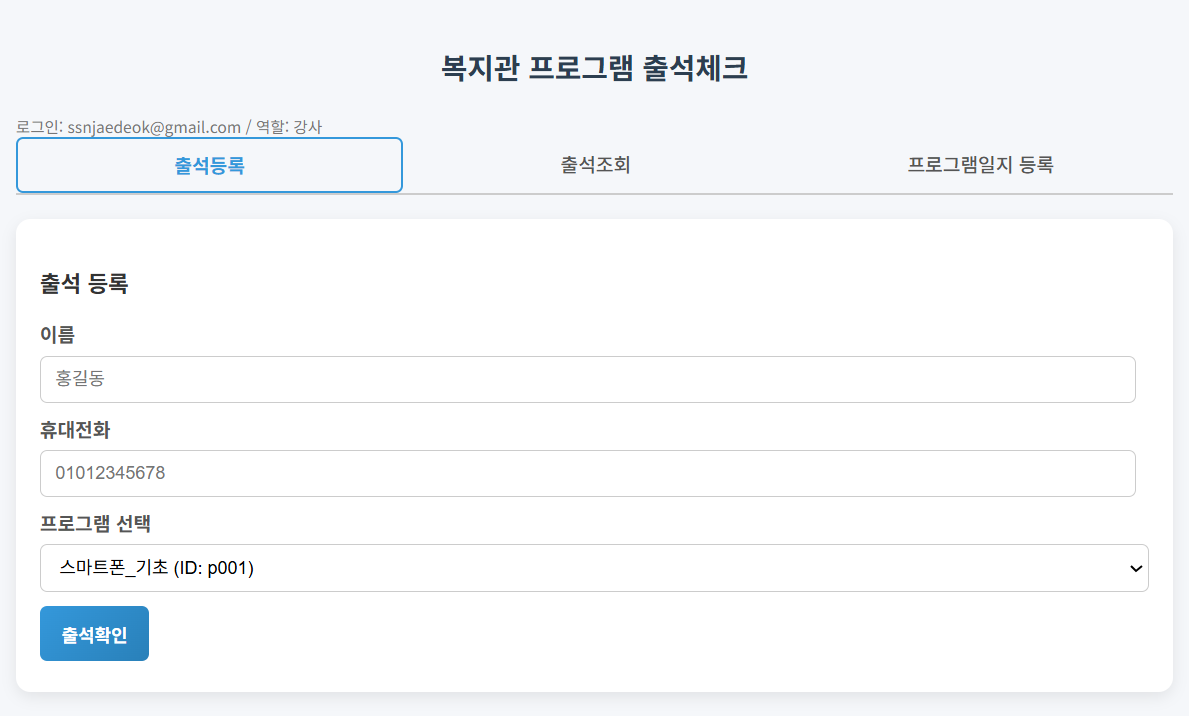
이제 배포해서 실행하면 로그인한 메일주소에 의해 담당자인지, 강사인지, 회원인지, 비회원인지 구분되어 화면이 나타난다.
회원은 출석등록을 할 수만 있고, 담당자나 강사는 출석등록 및 조회 일지등록을 할 수 있다.


'AppSheet' 카테고리의 다른 글
| 구글 앱스크립트 4차시 - 함수와 매개변수 (1) | 2025.12.20 |
|---|---|
| 구글 앱스크립트 3차시 - 조건문과 반복문 (1) | 2025.12.20 |
| 구글 앱스크립트 2차시 - 변수와 데이터 타입 (2) | 2025.12.20 |
| 구글 앱스크립트 1차시 - 시작하기 (2) | 2025.12.20 |
| AppSheet 개선된 에디터 화면 (Improved Editor) (14) | 2025.08.10 |


